|
|
 |
 |
|
Subscribe
|
|
Enter your email address and click the Subscribe button to receive updates via email.
|
|
|
If you are having problems subscribing, click here. |
|
|
Recent Posts
|
|
Categories
|
|
Archives
|
| |
|
|

ECMPS Support Blog
The Timeline is Marching Forward
Tuesday, February 24, 2009
   The countdown to April 1 continues The countdown to April 1 continuesAs the clock keeps ticking toward the first mandatory reporting period under ECMPS which will begin on Wednesday, April 1, 2009, there is even a shorter time line related to the release of the next version of the Client Tool and the ending of the testing period. Here are the relevant dates over the next few weeks: - March 6th ECMPS Users will begin to be able to use the CAMD Business System to set up their challenge questions. These challenge questions are part of CROMERR, and they must be set up before ECMPS users will be able to submit any data through the Client Tool under the next version. This is earlier than was originally scheduled. Users should be sure to set this up in advance of using the next version of the Client Tool.
- March 9th: The EPA Host System is closed down in order to begin preparations and data loading for the next release of the Client Tool. The EPA Host System will remain offline until March 17th.
- March 13th: The ECMPS Client Tool Preview (CTP) ends. The Test EPA Host System will be permanently shut down. All users should begin to use the production version of the Client Tool beginning with its release.
- March 17th: The next version of the production version of the Client Tool is scheduled to be released on or about March 17th. All existing production users will be required to upgrade to the new version. All new production users will need to download and install the latest version which will be available from the ECMPS Support Web site.
Labels: Preparing for ECMPS, Release Schedule Information
Preparing for ECMPS, Part 5
Friday, February 29, 2008
Dual Range Analyzers and the Scale Transition PointThis is the fifth in a series of posts that highlight ways to prepare for ECMPS. To view the entire series, click here to see all of the posts which are labeled, "Preparing for ECMPS". The last several posts have pointed out practical ways to correct monitoring plan data. This installment deals with another common monitoring plan problem that is easy to correct. If you use a dual range analyzer, you are required to report the scale transition point. First, the use a dual range analyzer is indicated by setting the dual range indicator to "1" in the analyzer data record. By setting that indicator to "1", the monitoring plan data will be subject to the SPAN-4 evaluation check which checks for the existence of the scale transition point in the non-flow span data for components which use a dual range. 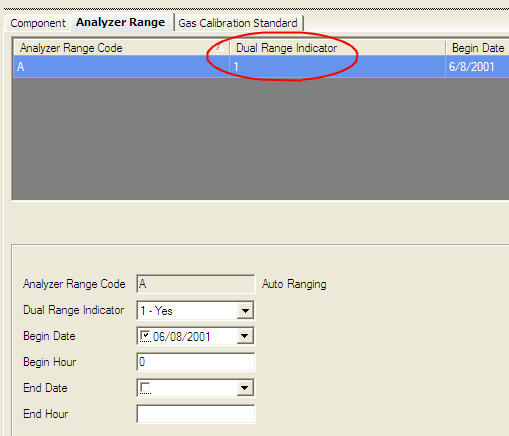 (Click on the picture to view an enlarged copy.) Second, the use of dual range analyzers requires that two active records--one for the low range and one for the high range--exist in your non-flow span data. In both records, the scale transition point needs to be added. For both records, this will be the same number because the scale transition point is defined as the scale transition point from the normal to the secondary range (see the information for the ScaleTransitionPoint in the Monitoring Span Data section of the monitoring plan data reporting instructions).  (Click on the picture to view an enlarged copy.) In order to correct the SPAN-4-D error, you simply need to add the same scale transition point to both the high and low span records. 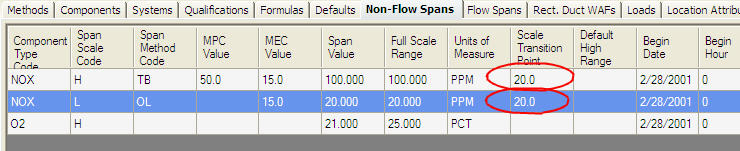 (Click on the picture to view an enlarged copy.) Labels: Preparing for ECMPS
Preparing for ECMPS, Part 4
Thursday, February 14, 2008
 Correcting Dates Correcting DatesAfter mentioning some important preliminary items in the first and second posts of this series, the third part in this series began to deal with specific monitoring plan evaluation errors and how to correct them. In this fourth post, the focus will continue to be on monitoring plan data, specifically correcting date errors. As soon as you install the Client Tool, you will be able to run evaluations on your monitoring plan data. The evaluation reports you generate will inevitably have errors that need to be corrected. There are several reasons for this. The reason for the errors which this post will focus on is dates. In ECMPS, your monitoring plan is a complete history of your monitoring plan. The evaluation looks at all of your monitoring plan data from January 1, 2003 to the present as a complete picture. For dates, that means that the begin dates and end dates matter. In MDC, your monitoring plan is evaluated from the viewpoint of a quarter. And for reporting purposes, you report the monitoring plan data which supports your quarterly emissions data. However, once you begin to look at a complete monitoring plan history, there is the possibility that dates will not match up as they should. In other cases, dates were not required when reporting with the EDR, but they are now required in ECMPS. In the case of new date requirements, some assumptions have been made in order to load your monitoring plan data into the new database. In general, date errors occur because the dates do not cover the entire evaluation period or the dates for two records overlap. 1. Fixing dates for data which do not cover the evaluation periodThe first case of not covering the evaluation period will generate errors that are similar to You reported 123, but you did not report FLOW span records to span the entire evaluation period for the component.Here is what the data might look like on the Add/Edit screen in the Client Tool. 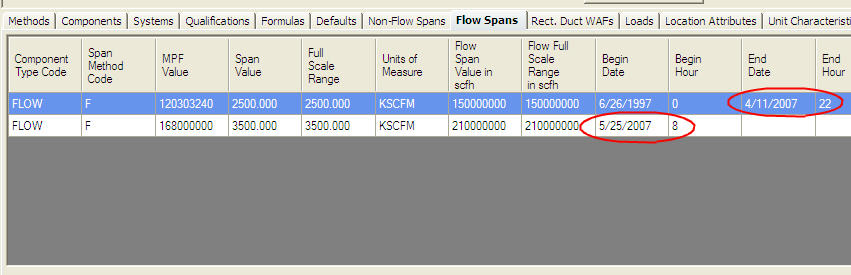 (Click on the picture to view an enlarged copy.) Notice, how the end date and end hour for the first record is 4/11/2007 hour 22 and the begin date for the second record is 5/25/2007 hour 8. With these dates, there is a gap in the flow span reporting which runs from 4/11/2007 hour 23 until 5/25/2007 hour 7. The evaluation error is corrected by data that covers that time period. Depending on the actual flow span data, there are three ways to correct this: - Add a flow span record which covers this time period.
- Modify the end date and hour of the first record.
- Modify the begin date and hour of the second record.
The method chosen should be used to reflect the actual flow span data. 2. Fixing dates for data which overlap during the evaluation periodThe second typical data error involves having overlapping dates. This evaluation error is simply the opposite of the first one. Instead, of having a gap in reported data for the evaluation period, there are two or more records reported for the same time period. The error message might read something like: You have reported FLOW 1/1/1995, but you have reported another span record with the same ComponentTypeCode (and SpanScaleCode) that was active at the same time.Here is what the data might look like on the Add/Edit screen in the Client Tool.  (Click on the picture to view an enlarged copy.) Note, how the end date and hour for the first record and the begin date and hour for the second record are the same--10/25/2005 hour 10. This is considered overlapping dates because the begin date and hour of the second record must be the very next hour after the end date and hour of the first record. There are two options for correcting this evaluation error: - Modify the end date and hour of the first record.
- Modify the begin date and hour of the second record.
The method selected to correct the evaluation error should reflect the actual data for the flow span. Labels: Preparing for ECMPS
Preparing for ECMPS, Part 3
Tuesday, January 22, 2008
New Requirements: Adding ProbesAfter mentioning some important preliminary items in the first and second posts of this series, the attention will now turn to correcting some problems in the monitoring plan data. As soon as you install the Client Tool, you will be able to run evaluations on your monitoring plan data. The evaluation reports you generate will inevitably have errors that need to be corrected. There are several reasons for this. One reason is that there are new reporting requirements in ECMPS that require sources to report data which was not required under the EDR. This post will focus on the new requirement to include a probe component for CEM systems. (See the Specific Considerations section of the MonitoringSystemData section of the Monitoring Plan Reporting Instructions.) If you evaluate your current monitoring plan in ECMPS and you have CEM systems, you will receive a SYSTEM-23-A evaluation error in your Monitoring Plan Evaluation report. The correction is very straightforward. Update your monitoring plan by adding all of the relevant probe components. Then link these probe components to your CEM systems. In the Client Tool, this is accomplished through the Monitoring Plan Data Module. After selecting the monitoring plan to edit, add a new probe component from the Component tab. Set the component type code to "PRB" and include a new component ID along with the manufacturer and the serial number. Click the Save Changes button. 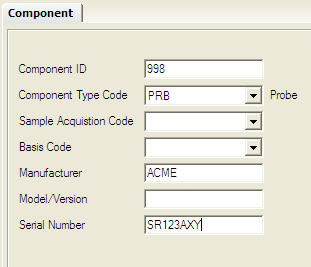 (Click on the picture to view an enlarged copy.) To associate the probe with the system, go to the Systems tab and select the system you want to modify. Then select the System Component tab in the lower part of the screen. Click the Add button. Select the probe component ID from the list of component IDs. Then enter the appropriate Begin Date and Begin Hour. Click the Save Changes button. 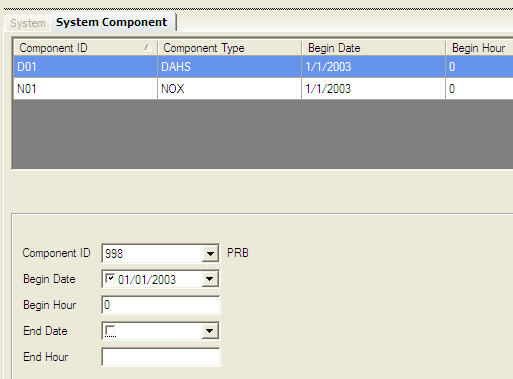 (Click on the picture to view an enlarged copy.) Labels: Preparing for ECMPS
Preparing for ECMPS, Part 2
Monday, January 14, 2008
ECMPS AgentsThis is the second in a series of posts that are written to provide information on how to prepare for the transition from reporting EDRs to reporting using the new ECMPS Client Tool. The first post in this series described how using the test version of the Client Tool is one of the best ways to prepare for the transition to ECMPS. Before getting into the details of what you can do to prepare by testing the Client Tool, it is important to mention another step that needs to be taken. That step is setting up ECMPS agents in order to provide users the access necessary to be able to use the Client Tool. As soon as a facility switches over to use ECMPS, the representatives associated with that facility will be able to use the Client Tool, but no one else who is associated with the facility will be able to use the Client Tool until ECMPS agents have been established. There are a few things to note about the ECMPS agents: - If anyone other than the representatives is going to use the Client Tool, ECMPS agents are required. This is true whether ECMPS is used for quarterly submissions or for submitting initial certification applications for CAIR SO2 or mercury.
- The ECMPS agent is a new type of agent. They are different from any of the other agents such as Source Management, Allowance Trading, General Account Management, or Compliance agents.
- CAMD will NOT be rolling current ETS-FTP agents over to become ECMPS agents.
- ECMPS Submit agents are assigned for a unit not a facility.
- Agents can be assigned now regardless of whether you have registered to use ECMPS yet or not. As soon as ECMPS is in production and you have registered to use ECMPS, the agent relationships which have been set up will become active.
- Details about ECMPS agents can be found in the Glossary on the CAMD Business System Web site.
- If you are not going to use ECMPS in 2008, you must keep your ETS-FTP agents current with CAMD.
Agents can be set up one of two ways. The first way is for representatives to assign people to be agents through the CAMD Business System. Note, only representatives can assign agents. The second way is to use the modified paper form which now includes ECMPS agents. Click here to use the form. Labels: Preparing for ECMPS
Preparing for ECMPS, Part 1
Monday, January 7, 2008
Register to Test Now that we are in 2008, we are that much closer to the official release of ECMPS. As that date draws closer for sources who will report first quarter 2008 data, stakeholders are starting to ask what they can do to prepare for the transition over to ECMPS. To answer that question, there will be a series of posts on the Blog to cover topics related to switching from reporting using EDRs to reporting using XML via the new ECMPS Client Tool. This first post will cover testing the ECMPS Client Tool. Currently, the ECMPS Client Tool is being tested by stakeholders using the Gamma A Release which was made available in December. Testing will continue until February 1, 2008. On that date, access to the Test EPA Host System will be stopped. That means that testers will not be able to synchronize data, retrieve data, or submit data because all of these functions require access to the Test EPA Host System. In addition, you will not be able to download, install, and test the Client Tool after February 1, because installation requires the ability to connect to the Test EPA Host System. However, after February 1, testers will still be able to use the Client Tool "off line". That means that testers can continue to work with any data which they have in their Client Tool. For example, testers can use all of the evaluation capabilities of the Client Tool to run the EPA evaluations on the data which they have in the Client Tool. For most testers, this has been the most valuable capability in testing. Note, the next time that the Client Tool is scheduled to be available for testing will be April 2008. Suggestion: For anyone who is interested in working with the Client Tool in order to prepare for the transition to ECMPS, go ahead and register to test the Client Tool before February 1, 2008. (If you wait, you will not be able to do any testing until April.) After registering, download and install the Client Tool. When you first connect to the Test EPA Host System, all of the monitoring plan data for all of the facilities you signed up for will be added to your Client Tool. Even if you do not have any time to work with the data before February 1, you will have your data in the Client Tool and you will be able to work with it after February 1 to run evaluations. These evaluations are very important because they will indicate all of the areas where data needs to be cleaned up or where data needs to be added to fulfill new requirements. To register to test the Client Tool, click here Labels: Preparing for ECMPS
|
| |
This Web site is the property of Perrin Quarles Associates, Inc. a contractor to the U.S. Environmental Protection Agency.
|


